TL;DR
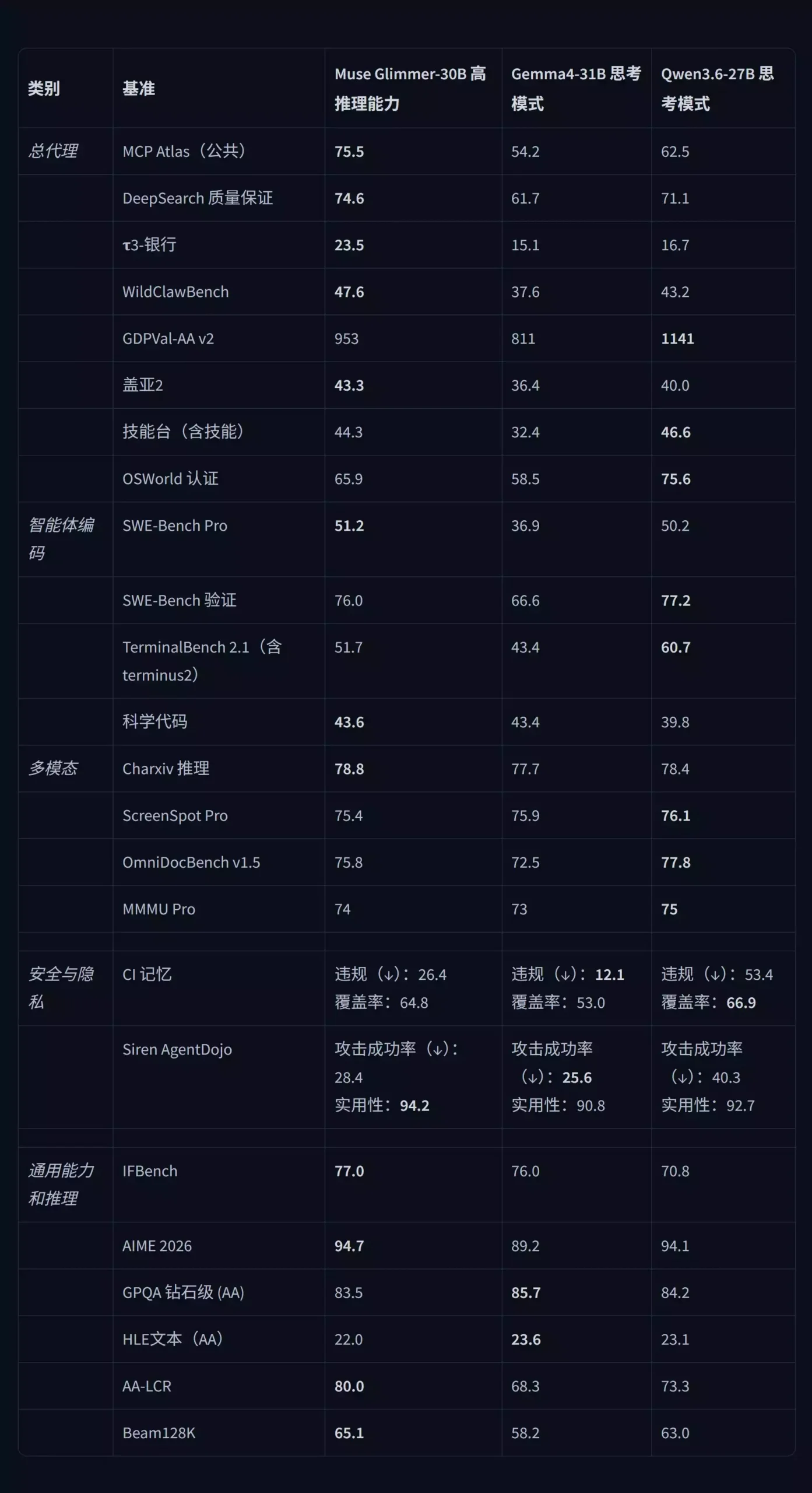
If you’ve been looking for an open-source model that is genuinely strong at local agent work and tool calling, Meta’s new Muse-Glimmer 30B deserves your attention. It isn’t another chat-then-code LLM — it was designed from the ground up around agent workflows, tool calling, multi-step tasks and autonomous execution: 75.5 on MCP Atlas, comfortably ahead of Qwen 3.6 27B’s 62.5; a 128K context window; and GGUF quants that run on as little as 8–10GB VRAM.
I ran the full deployment flow myself: download the GGUF model → install the latest llama.cpp → drop in the one-click launcher → double-click to start. In 5–10 minutes I had it running. In testing, D-Flash acceleration hit about 90 tokens/s versus ~45 tokens/s without it — a clean 2x with no visible quality loss. Connected to Hermes Agent, it organized my downloads folder on its own and built a playable parkour game from a screenshot. My conclusion: for local agents at 30B or below, Muse-Glimmer 30B is currently the best choice.
Quick Specs
| Metric | Data |
|---|---|
| Release Date | August 10, 2026 (Beijing time) |
| Parameters | ~30B dense (2B perception + 28B decoder) |
| Context Window | Up to 128K (131,072 tokens) |
| Multimodal | Text + image input |
| MCP Atlas | 75.5 (Qwen 3.6 27B: 62.5 / Gemma 4 31B: 54.2) |
| DeepSearch QA | 74.6 |
| Acceleration | D-Flash speculative decoding, ~2x measured |
| Inference Backend | llama.cpp (official collaboration) |
| VRAM | From 8-10GB (quants); Q4 ~15.9GB; F16 for 24GB+ |
| Agent Frameworks | OpenClaw, Hermes Agent |
| License | Apache 2.0 (free, commercial use OK) |
Why This Release Matters
There have been plenty of open-weight releases lately, but most still follow the general “chat and code” path. Muse-Glimmer 30B is different: Meta’s stated positioning is consumer hardware + autonomous agentic tasks — running real agent work on a local GPU instead of renting cloud compute.
1. Best-in-class agentic tool calling at 30B. MCP Atlas measures how well a model calls MCP tools and executes multi-step tasks. Muse-Glimmer 30B scores 75.5 — ahead of Qwen 3.6 27B (62.5) and far ahead of Gemma 4 31B (54.2). DeepSearch QA (deep search + Q&A) is 74.6.
2. Built for doing, not just talking. The training data is heavy on real tool-calling, code execution and file-operation scenarios, so the model understands task decomposition and multi-step execution rather than merely knowing tool names. Paired with OpenClaw or Hermes Agent, it autonomously handles file organization, coding and game generation locally.
3. Quantized versions actually run on consumer GPUs. The smallest GGUF quants run on 8–10GB VRAM; Q4_K_M is ~15.9GB for 16GB cards; 24GB cards can add D-Flash. Local agents no longer need to envy datacenter GPUs.
The 30B tier, compared by strength:
| Model | Biggest Strength |
|---|---|
| Muse-Glimmer 30B | 🥇 Agent / tool calling / local deployment |
| Qwen 3.6 27B | 🥇 Coding / all-round ability |
| Gemma 4 31B | 🥇 Multimodal / creative / all-round |
Bottom line: if your hardware is consumer-grade and your goal is letting AI actually do work — call tools, run code, manage files — Muse-Glimmer 30B is currently the best option at 30B or below.
For related reading, see our Qwen 3.8 Max review (same family as the Qwen 3.6 comparison above), and the models I benchmarked against in testing: DeepSeek V4 Flash and Kimi K3.
Official Resources & Downloads
Every download entry from the original post, as clickable links:
| Resource | Link |
|---|---|
| HuggingFace — official GGUF quants (unsloth) | Click here |
| Model mirror — Cloudeop drive | Click here |
| Model mirror — Quark drive | Click here |
| Model direct download — Google Drive | Click here |
| llama.cpp official repo | Click here |
| llama.cpp packaged build (all-platform drivers) | Click here |
| llama.cpp one-click bundle (beginner friendly) | Click here |
| One-click launcher script (drive) | Click here |
| One-click launcher script (fast link) | Click here |
| Hermes Agent official | Click here |
Local Deployment Guide (About 5 Minutes)
Step 1: Download the GGUF quantized model
Head to unsloth/Muse-Glimmer-30B-GGUF on HuggingFace and pick the quant that matches your VRAM (the original post also lists drive mirrors).
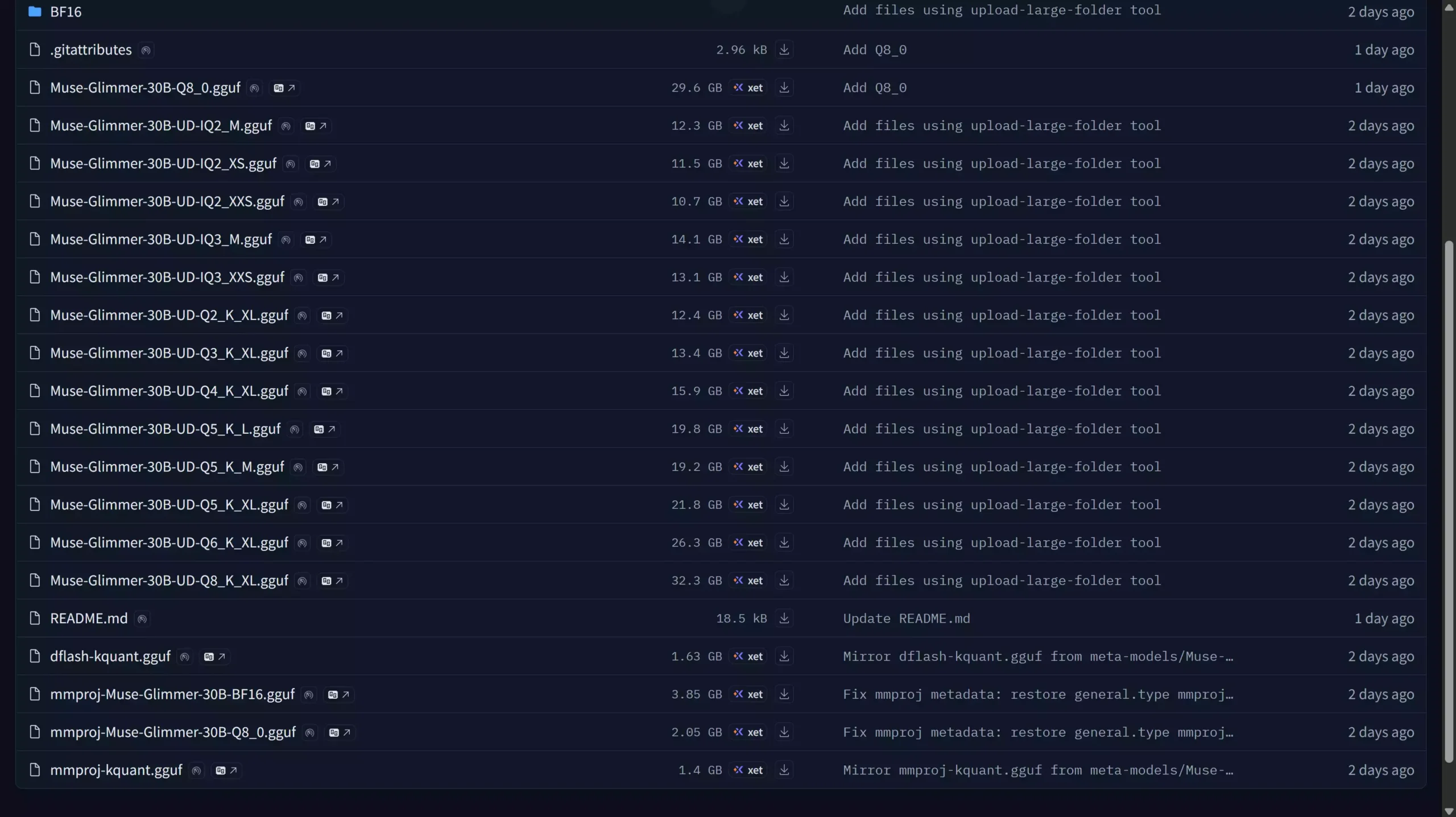
💡 Picking a variant: Q4_K_M is ~15.9GB and suits 16GB VRAM; the smallest quants run on 8–10GB; 24GB+ cards can use the F16 full model. For D-Flash, also grab the D-Flash acceleration model and the multimodal model — 3 model files in total, placed in a single
models/Muse Glimmer 30Bfolder.
Step 2: Install the latest llama.cpp
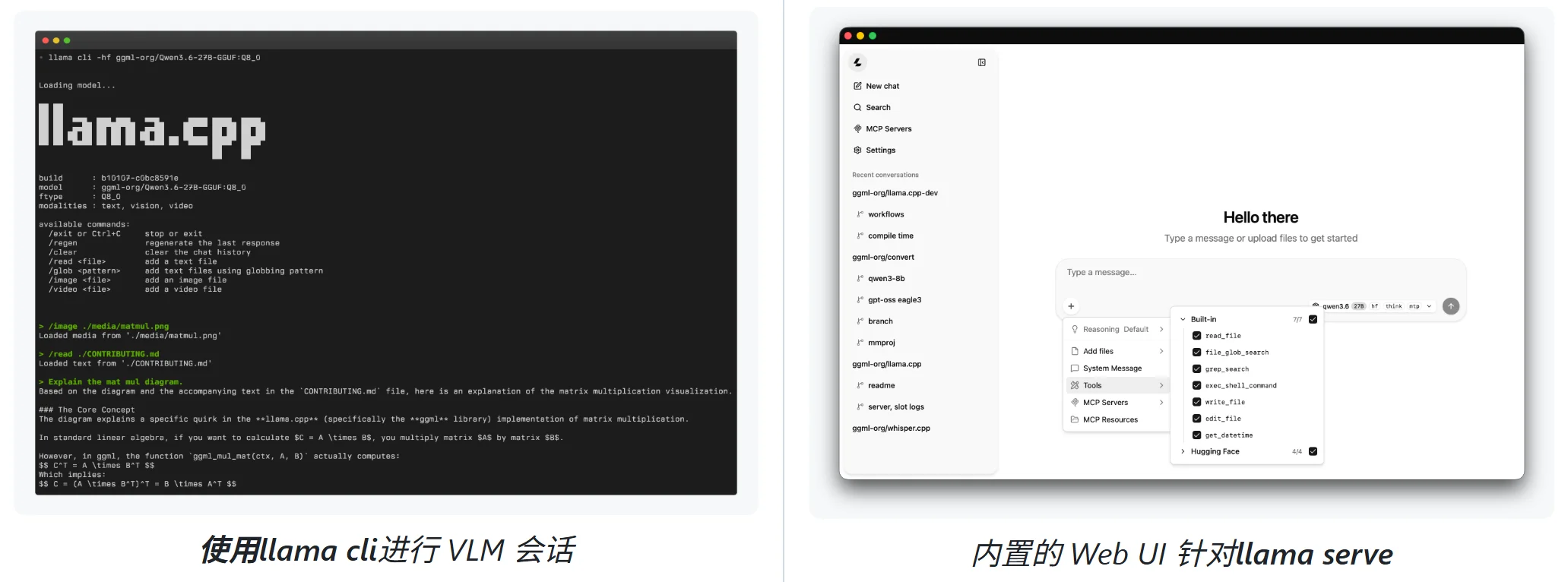
llama.cpp is the lightest way to run LLMs locally: pure C/C++, native Apple Silicon (M-series) support, NVIDIA CUDA / AMD ROCm / Intel / CPU coverage, and 1.5-bit to 8-bit integer quantization. Make sure it’s the latest build (b110362 in my test) — older versions won’t recognize the Muse-Glimmer quants.
- Official repo: github.com/ggml-org/llama.cpp
- Packaged build with all-platform drivers (N/A/I GPU, CPU, macOS): Download
- One-click bundle with the environment preconfigured: Click here
NVIDIA users should also unpack the driver files from the package into the same folder; if that sounds tedious, just use the one-click bundle.
Step 3: Download the one-click launcher script
The launcher auto-detects your GPU, picks the right startup parameters, lets you choose the model, and toggles D-Flash acceleration:
- Launcher script (drive): Download
- Launcher script (fast link): Click here
Extract it and copy all 3 files into the llama.cpp root directory.
Step 4: Assemble and launch
- Put your model folder into
modelsinside the llama.cpp root (create it if missing); - Copy the launcher’s 3 files into the llama.cpp root;
- Double-click the launcher, wait for the model to load, and a browser window opens automatically.
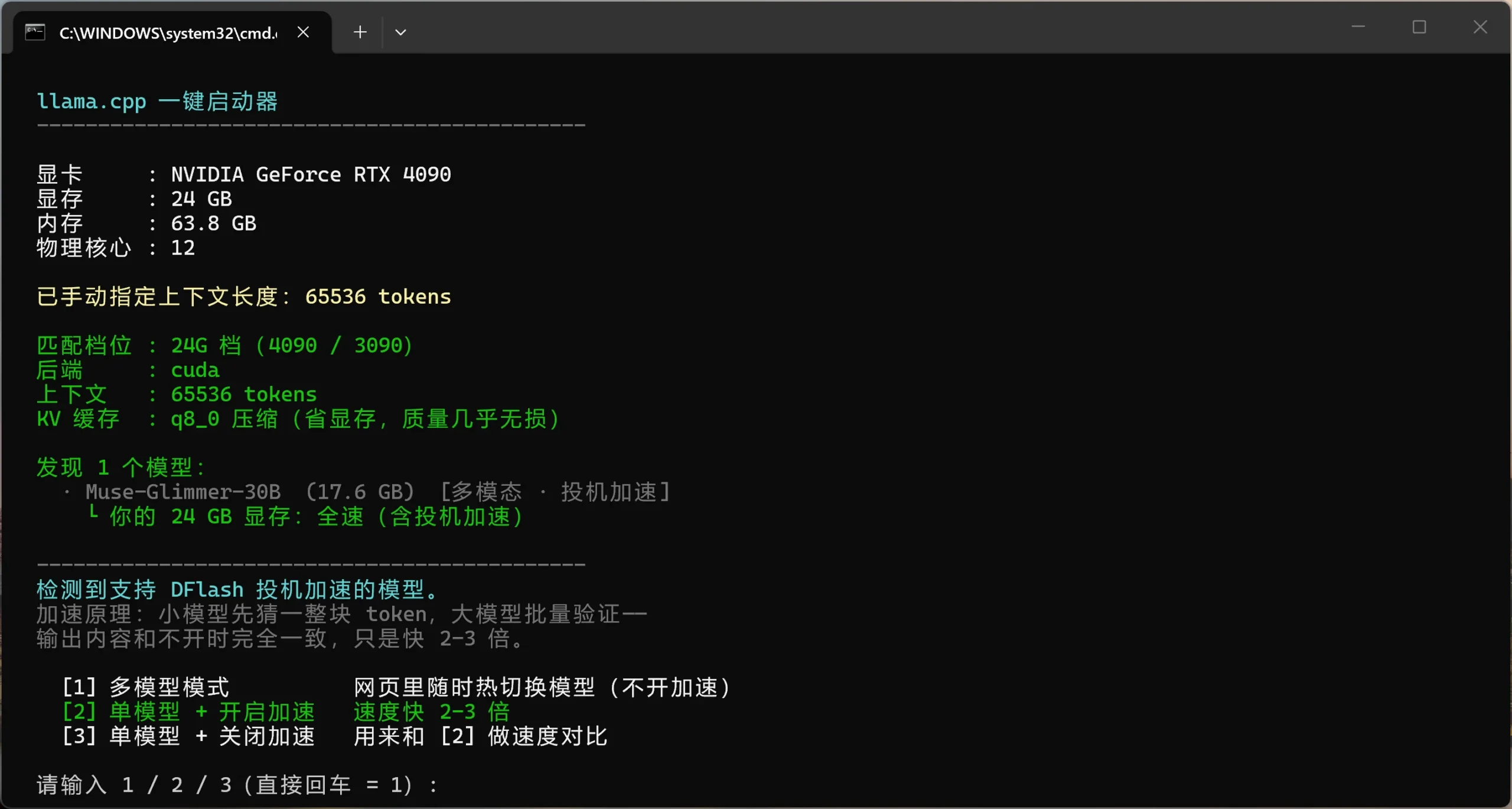
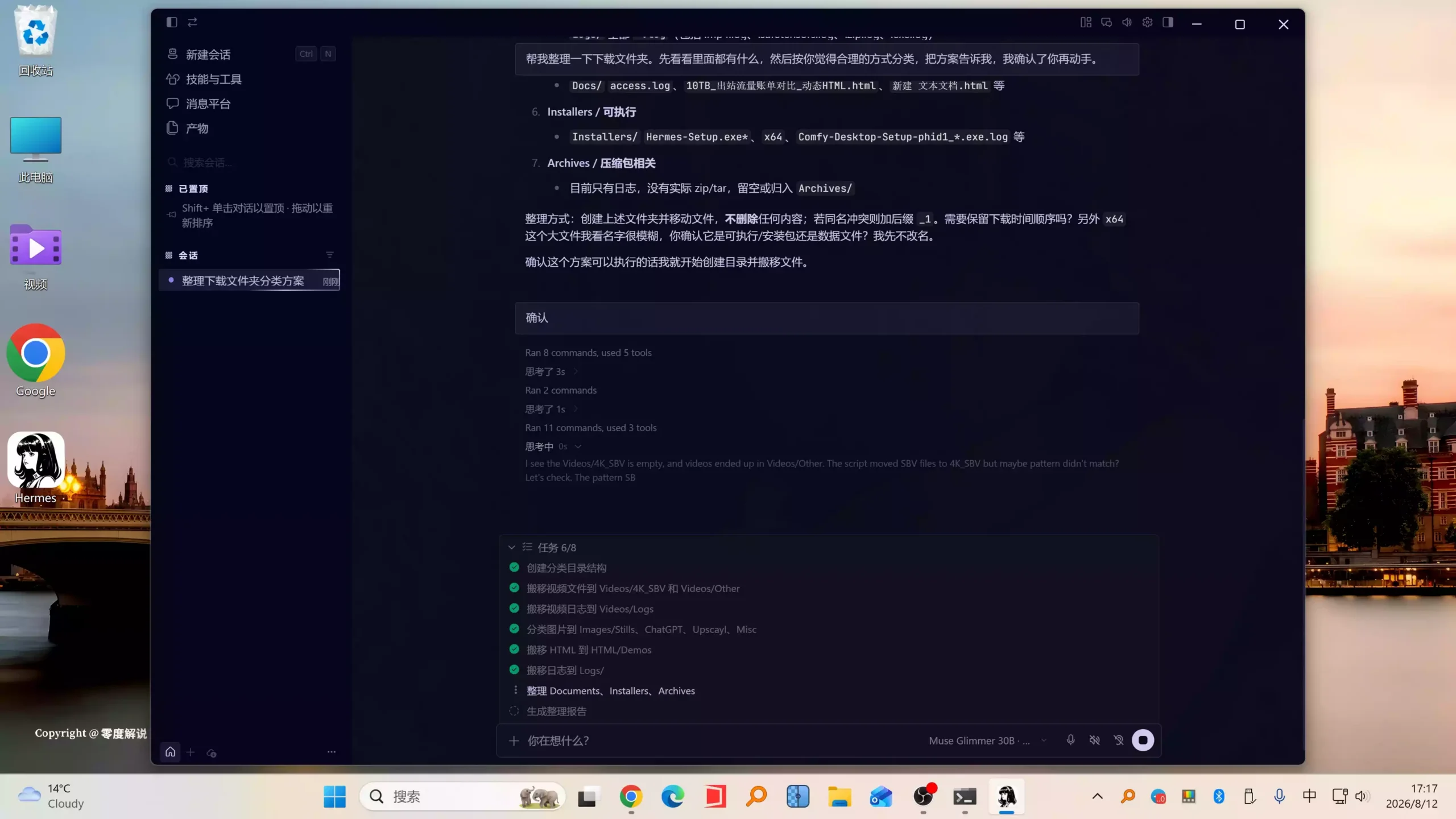
After launch the script reports “model found”; if your hardware supports it, it will also show “D-Flash speculative acceleration detected” — type the corresponding number to enable it.
Test 1: D-Flash Speed (90 vs 45 tokens/s)
I benchmarked the same setup with D-Flash on and off. With acceleration enabled, output ran at a steady ~90 tokens/s; with it disabled, the same task dropped to ~45 tokens/s — a clean 2x, with no visible quality change.
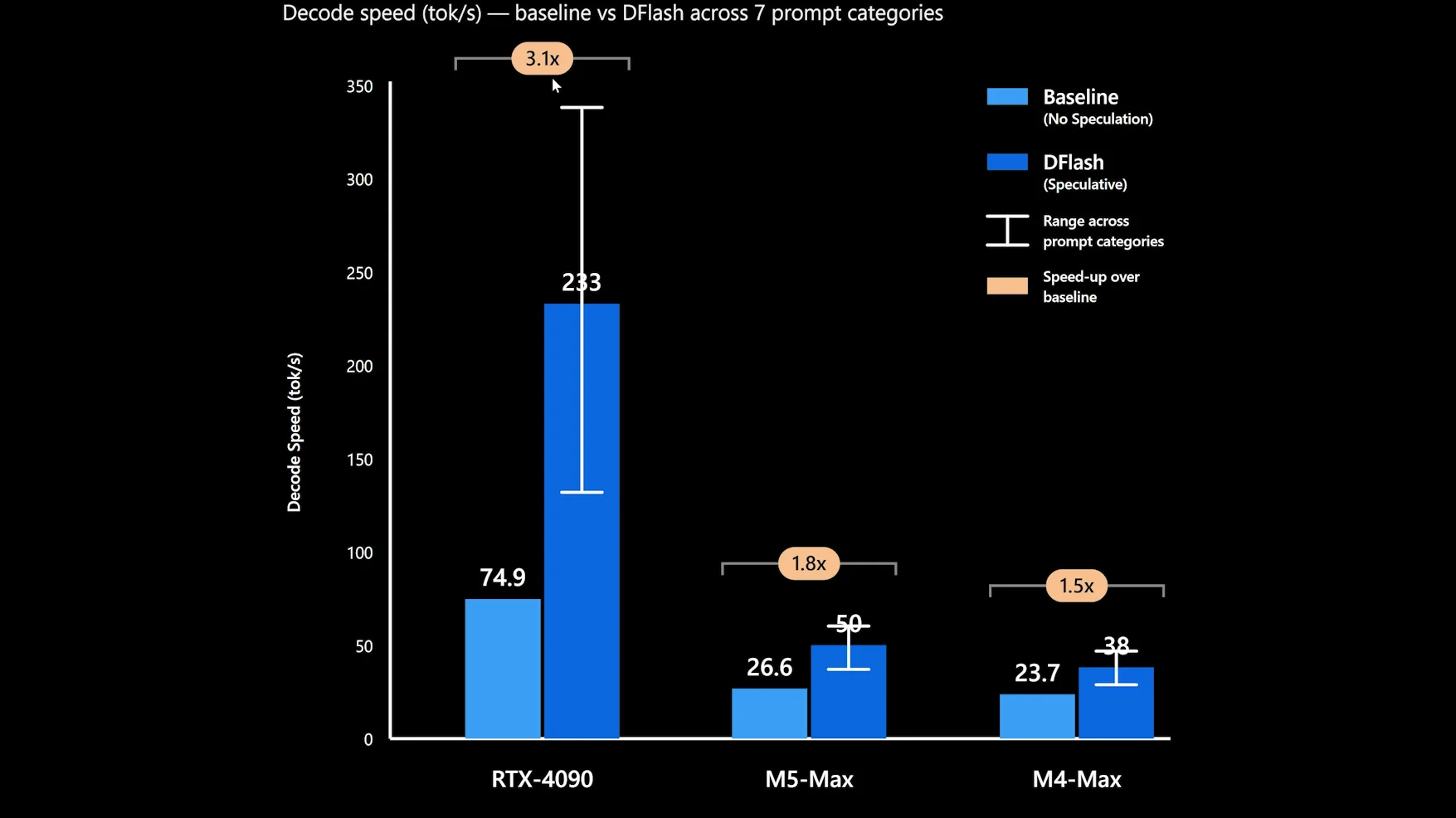
I also asked it to write a Flappy Bird game: with acceleration on it generated the whole thing in one pass and it was immediately playable. At this speed, local agent work stops feeling like waiting.
Test 2: Hermes Agent Tool Calling (Organizing a Downloads Folder)
Agentic ability is the main event here. I connected the model to the open-source Hermes Agent and gave it a real task — organize my downloads directory.
I first asked it only to “look at what’s inside, propose a reasonable classification, and wait for my confirmation.” It inspected the ~1.36GB folder and planned 7 top-level categories: video, images, HTML files, executables, archives, documents, and so on. After I confirmed, it created the folders, moved the files, and generated an organization report — fully autonomous, no hand-holding.
That “propose first, execute after confirmation” rhythm is exactly what a good agent should do — capable, but careful with your files.
Test 3: Multimodal — One Screenshot → a Playable Parkour Game
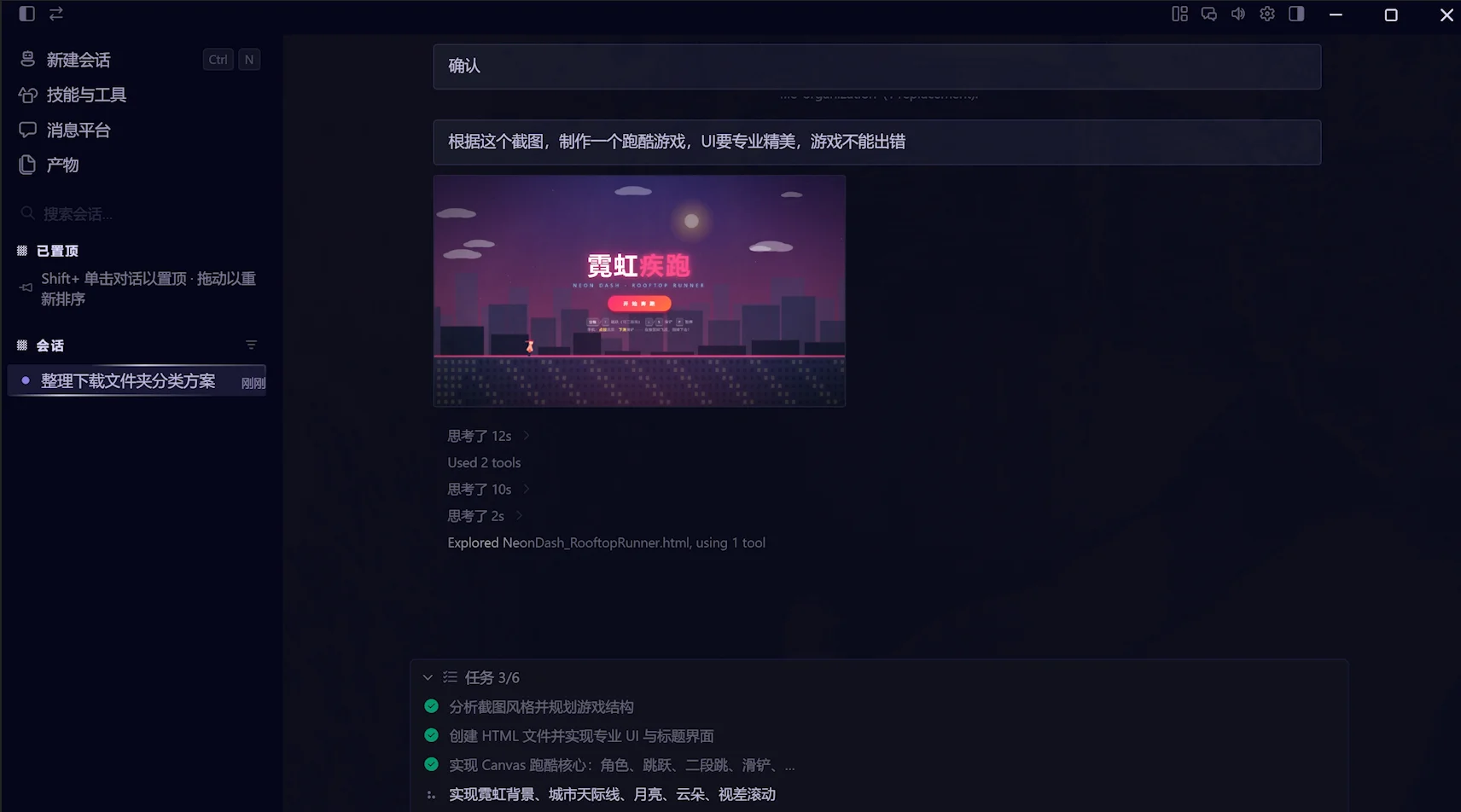
Multimodal is another strong suit. I gave it a game screenshot and asked it to “write a parkour game based on this image.” It implemented it with Canvas and HTML5, analyzed the visual style, planned the game structure, fixed its own errors mid-run, and produced a playable file — a neon parkour game with working jump, collision and death logic.
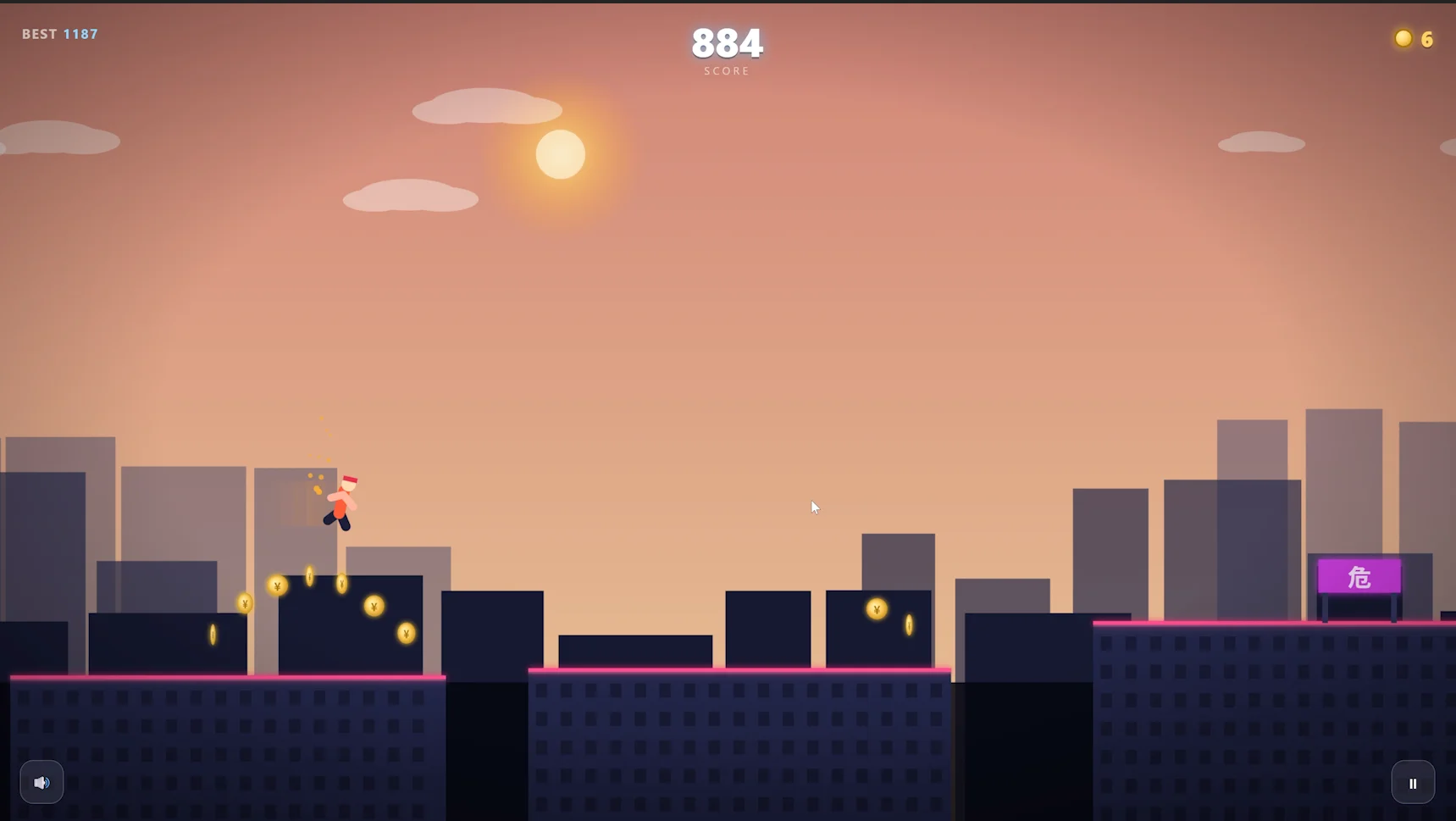
Community users have pushed even harder with a 2-bit quant: 5 straight minutes of autonomous repository bug hunting — reproducing bugs, fixing them, testing, and submitting PRs — all done by the model without human intervention.
Test 4: vs DeepSeek V4 Flash (a 9x Parameter Gap)
Using the same prompt, I had Muse-Glimmer 30B and DeepSeek V4 Flash (284B parameters) generate the same “magic lighthouse” scene. Honestly, the results were hard to tell apart — despite a roughly 9x parameter difference. That a 30B model lands this close says a lot about how far small agent-focused models have come.
Connecting Hermes Agent
To run Muse-Glimmer 30B as a local agent, Hermes Agent is the smoothest path:
- Install the latest Hermes Agent (visual installer);
- Once loaded, pick the “local endpoint” option in settings;
- Set the API URL to
http://localhost:8080/v1(the/v1suffix matters); - Any API key works for local mode (e.g.
12345678); - After it connects, you can switch the UI to Simplified Chinese and enable dark mode.
⚠️ If you already have Hermes installed, update it to the latest version before connecting.
FAQ
What is Muse-Glimmer 30B?
Muse-Glimmer 30B is Meta’s open-weight 30B agentic multimodal model released on August 10, 2026 under Apache 2.0. It targets local agent workflows, tool calling, multi-step tasks and autonomous execution, with a 128K context window, image input, and GGUF quants running on 8-10GB VRAM.
How does it compare with Qwen 3.6 27B and Gemma 4 31B?
All three lead the 30B tier but in different directions. Muse-Glimmer 30B tops agentic tool calling (MCP Atlas 75.5 vs 62.5 and 54.2); Qwen 3.6 27B leads at coding/all-round ability; Gemma 4 31B leads at multimodal/creative work. For local agents, Muse-Glimmer is the pick.
What GPU do I need?
Use GGUF quants: Q4_K_M ~15.9GB for 16GB VRAM; smallest quants for 8-10GB; F16 for 24GB+. In my test, a 24GB GPU with D-Flash delivered ~90 tokens/s.
Does it support Chinese? Can it run agents locally?
Yes. With Hermes Agent (or OpenClaw) pointed at http://localhost:8080/v1, it calls tools, executes code, organizes files and completes multi-step tasks autonomously with data staying local. In testing it sorted a downloads folder into 7 categories and built a playable parkour game from one image.
Where do I download it and how do I start?
Get the GGUF quants from unsloth/Muse-Glimmer-30B-GGUF on HuggingFace (drive mirrors are in the original post), pair them with the latest llama.cpp and the one-click launcher. The four-step setup is in the deployment guide above.
Is it really free? Can I use it commercially?
Yes — Apache 2.0. Personal use, commercial use, fine-tuning and redistribution are all permitted with no per-token billing. You only pay for your own hardware.
Pros, Cons & Verdict
| Score | Rating | One-liner |
|---|---|---|
| Agent / tool calling | 4.8 / 5 | MCP Atlas 75.5, best at the 30B tier; Hermes tests show real autonomous work |
| Performance / speed | 4.5 / 5 | D-Flash measured 2x (90 vs 45 tokens/s) with no quality loss |
| Deployment ease | 4.3 / 5 | One-click launcher helps, but you need the latest llama.cpp |
| Multimodal | 4.4 / 5 | Image-to-game worked first try, including self-repair of errors |
| Value | 5.0 / 5 | Apache 2.0, free, runs on 8GB VRAM quantized |
Overall, Muse-Glimmer 30B is the best option at 30B or below for running local agents: best-in-class tool calling in its tier, D-Flash solving the local-speed anxiety, and Hermes/OpenClaw keeping setup costs minimal. Its limitations are honest — 30B coding and all-round ability still trail bigger models — but as an on-device “get work done” model, it overdelivers.
If you’re building a local AI stack, combine it with what we’ve already tested: Grok 4.6 for cloud agents, Kimi K3 for open-source coding, and MiniMax H3 for on-device video generation.