TL;DR
The release that excited me most this week wasn’t another LLM benchmark — it was MiniMax open-sourcing MiniMax Music 3 on August 13, 2026. Give it one line of lyrics plus a short description of how the song should sound, and it generates a complete song of up to 5 minutes in one pass — vocals, melody, arrangement and accompaniment all baked in, output as 32kHz stereo WAV.
Even better, the weights are open and ComfyUI supports it natively. I ran the full deployment flow from scratch: download the latest ComfyUI → drop in 4 model files → import the official workflow → paste lyrics and style, hit Run. On a 24GB GPU, a 60-second track took about 20 seconds, and a 4–5 minute song took 1–2 minutes. Free, unlimited, Chinese lyrics included — for AI music, this feels like the Stable Diffusion moment.

Quick Specs
| Metric | Data |
|---|---|
| Release Date | August 13, 2026 (Beijing time) |
| Model Type | Open-weights text-to-music |
| Max Length | ~5 minutes per generation (intro/verse/chorus/bridge/outro) |
| Output | 32kHz / 16-bit / stereo WAV |
| Architecture | Hybrid-LM: 8B global LLM + 0.6B local LLM + 2.4B flow matching + 123M Flow-VAE |
| Diffusion Model | FP16 ~4.9GB / FP32 ~9.8GB / INT8 ~2.5GB |
| Text Encoder | Pruned INT8 ~9.2GB (official repackage) |
| VAE | minimax_music3_dav.safetensors ~217MB |
| VRAM | ~22GB for full quality; as low as 8GB with INT8 + streamed loading |
| Deployment | ComfyUI 0.33.0+, official template, no custom nodes |
| Pricing | Free / open weights (your GPU + electricity) |
| Test Speed | 60s song ≈ 20s; 4–5 min song ≈ 1–2 min (24GB VRAM) |
Why This Release Matters
I’ve spent a lot of time with AI music tools. Suno sounds great but bills per track, and a subscription adds up fast. The open-weight options — YuE, ACE-Step — either cap out around 3 minutes or fall apart on long vocals. MiniMax Music 3 addresses all three problems at once:
1. A full 5-minute song in a single generation. Not a 30-second demo — a complete arrangement with intro, verse, pre-chorus, chorus, bridge and outro, holding theme, rhythm, vocal character and production energy across the whole track.
2. Vocals that actually sing. Lyrics drive the performance, and structure tags decide where the emotion builds and the chorus lands. Under the hood it’s a Hybrid-LM design: an 8B global LLM (initialized from Qwen3-8B) models the song’s long-term semantics and structure, a 0.6B local LLM handles acoustic detail, and a 2.4B flow-matching stage plus a 123M Flow-VAE decoder synthesize the waveform. That’s why long tracks stay coherent instead of drifting after 30 seconds.
3. Local, free, unlimited. The weights are open, ComfyUI ships native support with an official example workflow, and everything downloads from HuggingFace. With the INT8 variant, even an 8GB card can run it. AI music no longer has to live in someone else’s cloud.
Bottom line: MiniMax Music 3 is the first open model that feels like a real daily alternative to hosted Suno — one line of lyrics plus a style description equals a full 5-minute song, for free, on your own hardware.
If you haven’t read our take on the same company’s video model, see the MiniMax H3 review. For the broader local-AI landscape, our Qwen 3.8 Max review and Grok 4.6 review cover the same “free + local” trend from the LLM side.
Official Resources & Links
Here are all the links I used, in clickable form — including the download entries from the original tutorial post, so you can jump straight to each site:
| Resource | Link |
|---|---|
| Original tutorial post (CN) | Click here |
| Mirror post with full video (CN) | Click here |
| ComfyUI official download (Desktop) | Click here |
| ComfyUI official docs tutorial | Click here |
| HuggingFace — ComfyUI-ready weights (Comfy-Org) | Click here |
| HuggingFace — original weights (MiniMaxAI) | Click here |
| Official workflow template (JSON direct link) | Download here |
| Official workflow templates repo | Click here |
| ComfyUI Wiki deep dive (EN) | Click here |
Hands-On Test: Running the Full Flow
I recorded the complete deployment and generation flow in the video below (all asset download links are listed in the notes under the video):
I followed the entire flow myself. The moments that stood out:
1. English track, 60 seconds: done in ~20s. Open ComfyUI, drag in the workflow, the template lyrics are already filled in with a default duration of 60 seconds. Hit Run and the progress bar moves visibly fast — no speed-up applied. The output is a complete English pop track with natural vocals and a full arrangement.
2. Chinese track, 180 seconds: done in ~1 minute. Swap the music description to the Chinese version and change the duration from 60 to 180 seconds. About a minute later you get a Mandarin pop song. Chinese articulation was the thing I cared most about — it’s clear, emotionally appropriate, and doesn’t have that synthetic “fake accent” feel. This run used the full FP16 model.
3. Two female-vocal versions back to back. Changing the style description to a softer ballad instantly changes the vocal character. This “swap description, swap singer” workflow is extremely practical for demos and short-video BGM.
4. The 5-minute limit test: actually 3:09. Setting duration to 300 seconds produced a 3:09 track, because the lyrics weren’t long enough — the model sizes the song to the amount of lyrics you give it. Write more lyrics, get a longer song. A 5-minute generation takes roughly 2 minutes.
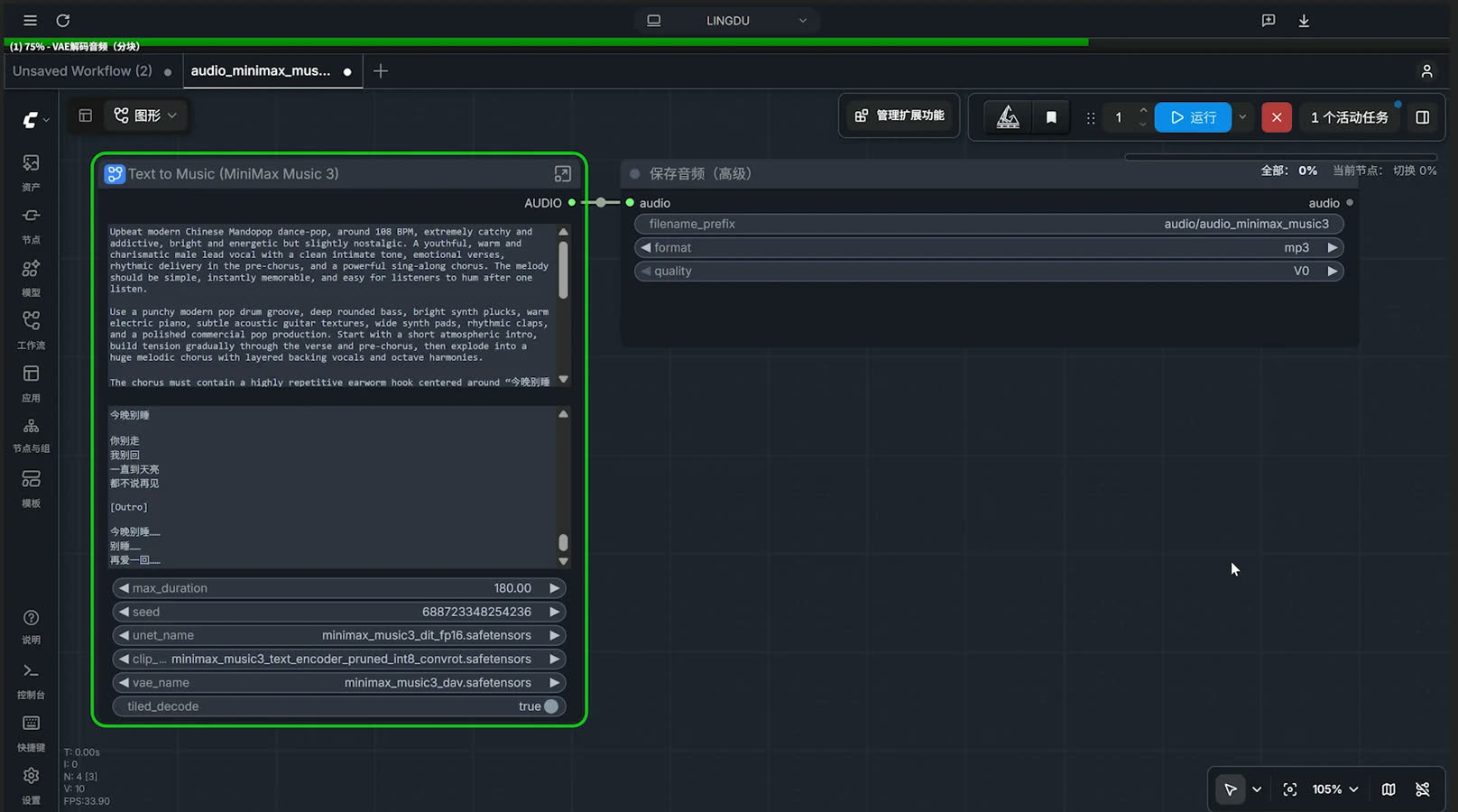
That screenshot is the node graph after deployment: the top text field is the music description (how the song should sound and be arranged), the bottom field is the lyrics, and the parameter panel shows max_duration: 180.00, unet_name: minimax_music3_dit_fp16.safetensors, vae_name: minimax_music3_dav.safetensors, with tiled_decode enabled to save VRAM. The highlighted green node is the MiniMax Music 3 generator, wired straight into a “Save Audio (Advanced)” node. Hit Run, wait for the progress bar, and the WAV lands in ComfyUI’s output folder.
Test conclusion: Chinese lyrics work, vocals sound natural, long tracks stay coherent, and generation is faster than I expected. For a free open model, this goes well beyond “playable” — it’s at “shippable” quality.
Deployment Guide: Running It Locally, Step by Step
Step 1: Download the latest ComfyUI
MiniMax Music 3 needs ComfyUI 0.33.0 or newer (0.33.1 also fixed VRAM-related issues). If you already have ComfyUI installed, update it — older builds won’t recognize the MiniMax Music 3 nodes.
- Official download: ComfyUI Desktop at comfy.org
- Or install from GitHub
Default installation is fine for beginners. If ComfyUI prompts you to upgrade after launch, do it before continuing.
Step 2: Download the 4 model files
MiniMax Music 3 needs 4 model files in ComfyUI, placed into three folders:
📂 ComfyUI/ ├── 📂 models/ │ ├── 📂 diffusion_models/ │ │ ├── minimax_music3_dit_fp16.safetensors # full precision (~4.9GB, recommended) │ │ └── minimax_music3_dit_int8_convrot.safetensors # INT8 quantized (~2.5GB, low VRAM) │ ├── 📂 text_encoders/ │ │ └── minimax_music3_text_encoder_pruned_int8_convrot.safetensors # ~9.2GB │ └── 📂 vae/ │ └── minimax_music3_dav.safetensors # ~217MB
Everything is in the ComfyUI-ready repo on HuggingFace: Comfy-Org/MiniMax-Music-3 (original weights: MiniMaxAI/MiniMax-Music3). If HuggingFace is slow from your region, use a mirror or the cloud-drive links from the original post.
Picking a variant:
| Your GPU | Recommended setup |
|---|---|
| 24GB+ | FP16 full model (best quality and speed) |
| 8–16GB | INT8 + CPU auto-offload (works, slower) |
| Not sure | Download both diffusion variants and switch as needed |
Step 3: Place the files in the right folders
On Windows with default ComfyUI Desktop install, the model directory is under your user profile (AppData is hidden — enable “Show hidden items” in Explorer first):
C:\Users\<your-username>\AppData\Local\Comfy-Desktop\ComfyUI\modelsInside models:
- Open
diffusion_modelsand drop in the FP16 or INT8 diffusion model; - Go back to
models, opentext_encoders, drop in the text encoder; - Go back to
models, openvae, drop in the VAE.
Once all 4 files are in place, the node will let you select the exact model names shown above.
Step 4: Import the workflow
Easiest path: open ComfyUI’s template library → Audio category → select MiniMax Music 3 Text to Music. The official template wires all the nodes for you.
Manual path: download audio_minimax_music_3.json, click “Create blank workflow” (the + icon), and drag the JSON file onto the canvas. If no node shows a red error, your model files are in the right folders.
Step 5: Fill in the fields and run
Three key inputs in the workflow:
- Music description / Style prompt (top field): genre, BPM, instrumentation, mood arc;
- Lyrics (bottom field): the words to sing, with optional
[Intro],[Verse],[Chorus],[Bridge]structure tags; - max_duration (parameter panel): song length in seconds — default 60; set 180 or 300 for 3- or 5-minute tracks.
Hit the blue Run button in the top-right. When the progress bar finishes, the WAV is written to ComfyUI’s output folder (filename prefix is set in the Save Audio node, default audio/audio_minimax_music3).
Prompt Examples
I’ve included the two complete prompt sets I used, verbatim. Copy the first one straight into the workflow.
”Tonight Stay Awake” — male-vocal Mandarin dance-pop (108 BPM)
# Music Description / Style Prompt
Upbeat modern Chinese Mandopop dance-pop, around 108 BPM, extremely catchy and addictive, bright and energetic but slightly nostalgic. A youthful, warm and charismatic male lead vocal with a clean intimate tone, emotional verses, rhythmic delivery in the pre-chorus, and a powerful sing-along chorus. The melody should be simple, instantly memorable, and easy for listeners to hum after one listen.

Use a punchy modern pop drum groove, deep rounded bass, bright synth plucks, warm electric piano, subtle acoustic guitar textures, wide synth pads, rhythmic claps, and a polished commercial pop production. Start with a short atmospheric intro, build tension gradually through the verse and pre-chorus, then explode into a huge melodic chorus with layered backing vocals and octave harmonies.

The chorus must contain a highly repetitive earworm hook centered around "今晚别睡 / 别睡 / 再爱一回", with strong rhythmic emphasis and a melody that feels satisfying when repeated. Add tasteful vocal chops, call-and-response backing vocals, short instrumental fills, and a memorable post-chorus instrumental hook.

Overall feeling: euphoric, romantic, youthful, warm, carefree, slightly nostalgic, radio-friendly, highly replayable, instantly singable, catchy from the first chorus.

Avoid overly complex melodies, excessive vocal runs, dark atmosphere, heavy rock elements, or overly aggressive EDM drops.

# Lyrics
[Intro]
今晚的风
吹过你的脸
灯亮了一点
心跳快一点

[Verse 1]
城市的霓虹还没睡
我们沿着街一直追
你说今天不想回
我说那就再走一回

[Chorus]
今晚别睡
别睡 别睡
让月亮陪我们到天黑
今晚别睡
别睡 别睡
有你在身边什么都对
再靠近一点点
再爱一回

[Bridge]
如果时间真的会停
我希望停在这里
没有人催
没有人追
只有你和我
还有这一首歌

[Outro]
今晚别睡……
别睡……
再爱一回……
“I’m Coming Home” — female-vocal ballad (72 BPM)
Style direction: a warm, delicate female voice, 72 BPM modern Chinese pop ballad. Start sparse — soft felt piano and room ambience, like a young woman quietly remembering her childhood on a rainy evening. Build emotion through the pre-chorus with warm strings, and let the chorus expand with cinematic strings and layered female harmonies. Strip everything down to piano and voice in the bridge, then close on the line “妈妈,我想回家” with a long emotional tail.
The complete lyrics and full style prompt are in the original post: freedidi.com/25164.html, also mirrored at zxcyw.com.
💡 Pro tip: if you don’t want to write lyrics or arrangement notes yourself, ask ChatGPT, DeepSeek or Kimi to generate them — describe the genre, BPM, mood and instrumentation you want, then paste the result into the workflow. In the test, DeepSeek-generated Chinese lyrics and style descriptions worked perfectly, structure tags included.
FAQ
What is MiniMax Music 3?
MiniMax Music 3 is an open-weights text-to-music model released by MiniMax on August 13, 2026. One line of lyrics plus a style description generates a complete song of up to about 5 minutes in a single pass — vocals, melody, arrangement and accompaniment — output as 32kHz 16-bit stereo WAV, with native ComfyUI support.
How much does it cost per song?
Nothing locally: the weights are free, so generate unlimited songs for the price of electricity. A paid hosted API (music-3.0) is also available if you’d rather skip local setup.
What GPU do I need?
FP16 ~4.9GB, FP32 ~9.8GB, INT8 ~2.5GB diffusion variants. Full quality needs ~22GB VRAM; INT8 plus streamed loading works down to 8GB. On 24GB VRAM, a 60-second song took ~20 seconds and a 4–5 minute song took 1–2 minutes in testing.
Does it support Chinese lyrics?
Yes. Chinese vocals tested clear and emotionally natural. Genre is controlled through the description field — specify style, BPM, instrumentation and mood for Mandarin pop, ballads, C-pop dance and more. ChatGPT/DeepSeek/Kimi can write the lyrics for you.
Can I use the songs commercially?
Locally generated songs are your own creations — fine for personal projects, video soundtracks, and music platforms that pay royalties. The model weights use the MiniMax Community License: free for personal use, visible MiniMax-Music3 attribution required for commercial product integration, separate licensing for very large companies.
How do I get started?
Three steps: install the latest ComfyUI Desktop → download the 4 model files from Comfy-Org/MiniMax-Music-3 and place them in the right folders → open the MiniMax Music 3 Text to Music template, paste lyrics and style description, and hit Run. Full paths are in the deployment guide above.
Pros, Cons & Verdict
| Score | Rating | One-liner |
|---|---|---|
| Output quality | 4.7 / 5 | Natural vocals, coherent structure, 5-minute tracks hold up |
| Chinese support | 4.8 / 5 | Clear articulation, follows the style prompt well |
| Deployment ease | 4.2 / 5 | Official template one-click, but big downloads and a new ComfyUI required |
| Value | 5.0 / 5 | Free, unlimited, local — a Suno subscription just became optional |
| Ecosystem | 4.5 / 5 | Official template + community extensions inside ComfyUI |
Overall, MiniMax Music 3 is the closest thing to a local Suno I’ve seen from an open model: 5-minute complete songs, natural Chinese vocals, native ComfyUI support, an INT8 variant that fits consumer GPUs, and zero per-track cost. The trade-offs are honest — large downloads, a ComfyUI version requirement, and output quality that depends on your prompting. But as an open-weights release, this is a milestone.
If you want to zero out your BGM budget, install it today and generate one track tonight. Use DeepSeek V4 Flash or Kimi K3 to write the lyrics, and you have a completely free “AI lyrics + local song” pipeline.